
Building and Deployment
The day-to-day workflow for editing documentation: requirements, building, serving locally, link checking, Mermaid diagrams, screenshots, and the deployment to docs.twinbasic.com. Aimed at content contributors --- if you are modifying the build pipeline itself, see tbdocs Internals instead.
Development environment
The documentation is rendered to HTML by tbdocs, a custom Node.js static site generator that lives under builder/. The day-to-day commands below are Windows batch files that wrap the generator; their POSIX equivalents are listed alongside.
Ensure the requirements below are met.
Fork https://github.com/twinbasic/documentation to your own GitHub account if you plan on making any changes, or for convenience. Skip this if you only want to build the docs locally without contributing changes.
Clone either your fork or the documentation repository itself.
Requirements
- Node.js 22+ for
tbdocsitself. The site builds offline with no Ruby toolchain. npm ciat the repository root installs everything: the static site generator's deps, the PDF renderer's deps, andpuppeteer(shared by both the PDF renderer and mermaid's.mmd→.svgregenerator). A singlepackage.jsonat the repo root carries the whole dependency set. Thebuild.bat/serve.batwrappers assume the install has run.- Chromium is required whenever an
.mmddiagram needs regenerating and whenever the PDF book is rendered. It is downloaded once bynpx puppeteer browsers install chrome --install-deps. A missing Chromium during a build downgrades to a warning and reuses the on-disk.svg, so first-time setups that skip the install step still build (just without diagram updates).
Building
To render the documentation from .md files into the _site/ (online), _site-offline/ (offline mirror), and _site-pdf/ (sparse PDF source) folders:
build.bat
or directly:
node builder\tbdocs.mjs --src docs
A single tbdocs run produces all three trees. The also_build_offline and also_build_pdf keys in _config.yml toggle the sibling outputs; the --no-offline and --no-pdf flags do the same from the command line if you only want _site/.
The full set of tbdocs CLI flags --- every flag, what each one does, when to use it --- lives on the Tools and Scripts page.
Building and local serving
The simplest local preview is build.bat followed by opening the rendered files in any browser. To get a localhost server instead:
serve.bat
This runs tbdocs --serve: after an initial build, an HTTP server binds to port 4000 (pass --port <N> to use a different port), a recursive source-tree watcher fires a debounced rebuild on each file change, and any browser tab open on the page auto-reloads via SSE after each successful rebuild. Only failures (4xx, 5xx, server exceptions) are logged --- successful requests are silent. Ctrl+C exits cleanly.
Serve writes to docs/_serve/, completely disjoint from build.bat's _site/ family. That separation means a one-off build.bat invocation (e.g., to refresh _site-pdf/ for book.bat, or to re-check _site-offline/ link integrity) never touches the tree the live preview is serving, and the preview keeps showing whatever serve last rebuilt.
Checking link integrity
Before checking link integrity, the documentation must be built:
check.bat
This runs two passes of scripts/check_links.mjs: one against _site/ (the online tree) and one against _site-offline/ (the file://-browsable mirror) with --forbid 'https://docs.twinbasic.com' to also flag any surviving live-site link --- the offline mirror should never navigate back to the live docs site. Both checks also assert HTML well-formedness, duplicate-id detection, anchor resolution, accessibility hints, and (for the online tree) the sitemap and search-index integrity. The same two checks run in CI on every pull request and on every push to staging.
A clean check.bat run is the bar for "ready to commit".
Mermaid diagrams
Mermaid diagrams live as .mmd source files under docs/assets/images/mmd/ and are referenced from markdown as .svg:

tbdocs regenerates each .svg from its .mmd sibling when the SVG is missing or older than its source --- editing a .mmd by one character regenerates the SVG on the next build. Both files belong in git; the .mmd is the canonical source, the .svg is the build artifact that the browser actually loads.
The renderer drives puppeteer + the mermaid package directly (both regular dependencies in the repo-root package.json). One headless Chromium covers the whole batch --- previously the project shelled out to @mermaid-js/mermaid-cli which forked a fresh node + Chrome process per diagram and shipped its own bundled puppeteer-core. The direct path keeps the dependency tree smaller, removes the per-file process startup overhead, and uses the same Chromium cache as render-book.mjs. Two failure modes are handled distinctly:
- Setup failures (no puppeteer, no Chrome, no mermaid) emit a one-line warning, retain the existing on-disk SVGs, and let the build exit 0 --- a fresh checkout without
npm installor a sandbox without Chromium doesn't break unrelated work. - Content failures (broken
.mmdsyntax, render exception) emit the parser error verbatim, leave that diagram's previous SVG in place, continue rendering the rest of the batch, and flipprocess.exitCode = 1so CI catches the bad diagram.
In serve mode the watcher ignores writes to assets/images/mmd/*.svg. The .mmd is the source of truth; the .svg is the build artifact mermaid emits back under srcRoot. Without the filter, each .mmd edit would fire two rebuilds (one on the edit, one on the SVG write) and the browser would reload twice for one user change.
Deploying to docs.twinbasic.com
Push your changes to your GitHub fork of the documentation repository.
Click compare across forks.
Select your repository and branch to merge from.

Create the pull request.
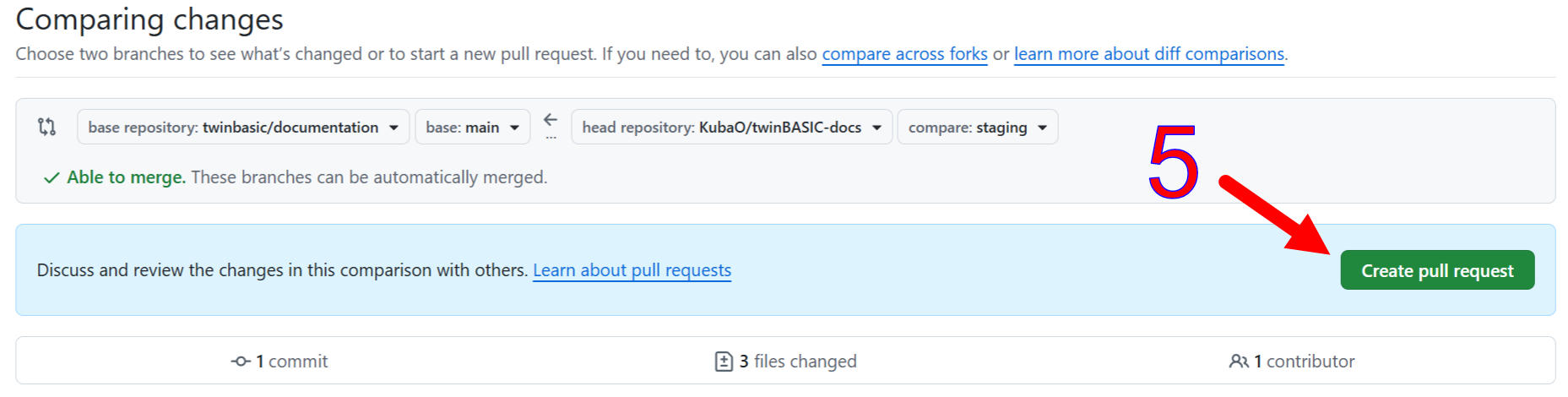
A maintainer will merge the pull request into the documentation repository. You may wish to mention an outstanding request on the #docs channel, although the #github-docs channel provides automated notifications of pull requests. Normally, a maintainer will get a notification of a new pull request via Discord, and will merge it or comment with a request for changes.
The steps below are done by maintainers.
Review, then merge the pull request or comment with required changes.
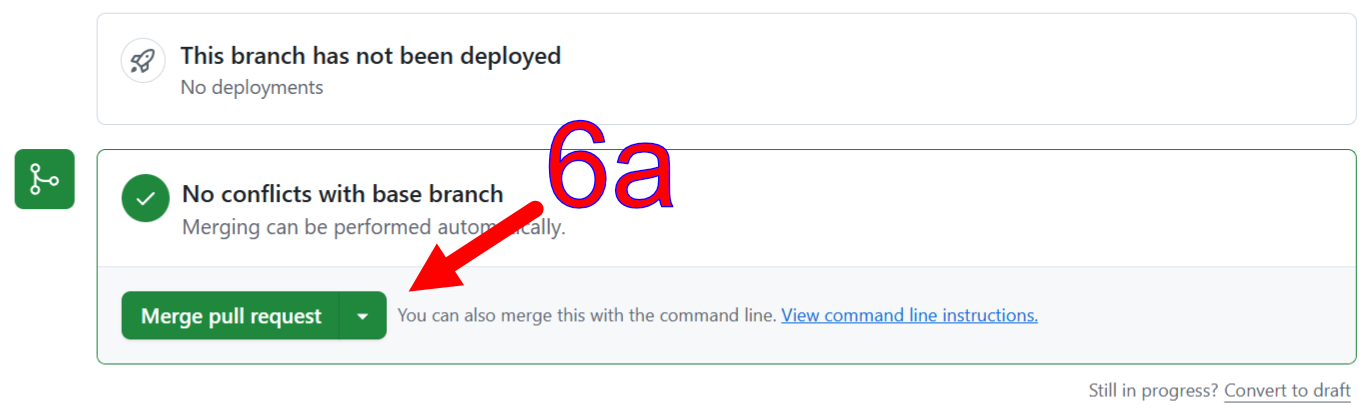
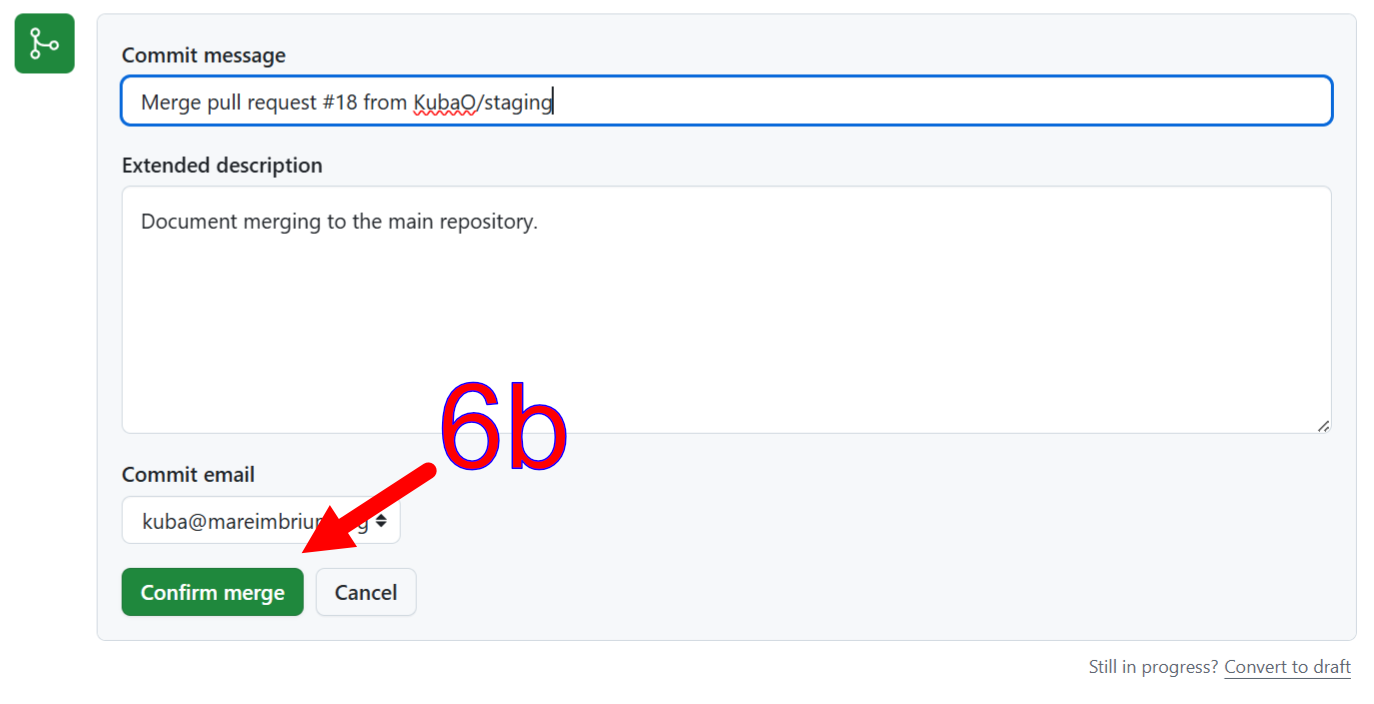
Select the Build & deploy docs action.
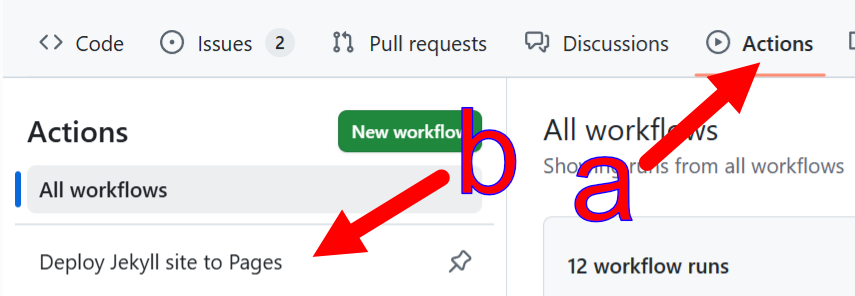
Manually run the build and deployment workflow if a release snapshot is needed. (Pushes to
stagingdeploy to Pages automatically; only the manual run additionally cuts a GitHub release with the offline-browsable site copy attached as a zip and the PDF book attached.)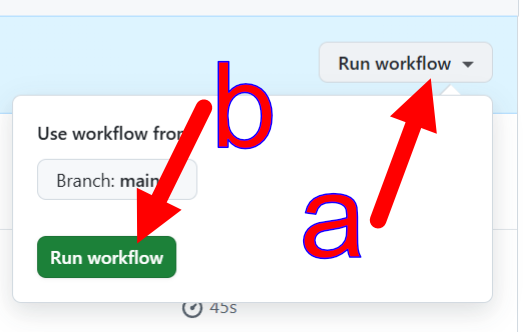
Editing screenshots
One way to edit screenshots is to use an integrated vector / pixel program like Affinity1. A possible workflow:
PrtSc to capture the screenshot.
In Affinity, Ctrl-Alt-Shift-N (File, New from Clipboard) to get the entire screenshot into the program.
Use the Vector Crop tool (from the Vector studio) to crop the screenshot down to the relevant part.


Select the cropped image and copy it to the clipboard with Ctrl-C.
Create a new file from clipboard again to open a document with just the cropped screenshot Ctrl-Alt-Shift-N (File, New from Clipboard).
Close the file you opened in step 2.
Add arrows and labels as needed. Those can be copy-pasted from other
.affiles in this repository.Export to PNG via Ctrl-Alt-Shift-W (File, Export, Export...).
INFO
It is a convention to put the .af ("source") files in the _Images folder, and the exported .png files in the Images folder. Only the latter is published to the website. The former is preserved as the source for easy editing and updates.
1 Affinity is a free-as-in-beer suite that combines a vector editor, a bitmap editor, and a publishing layout editor. A Canva account is required to download; the accounts are free.