
Jump Jump Game Documentation
1. Game Overview
Jump Jump is a 3D jumping platform game featuring an isometric view. Players control a character to jump between different platforms, testing their timing judgment and spatial awareness.
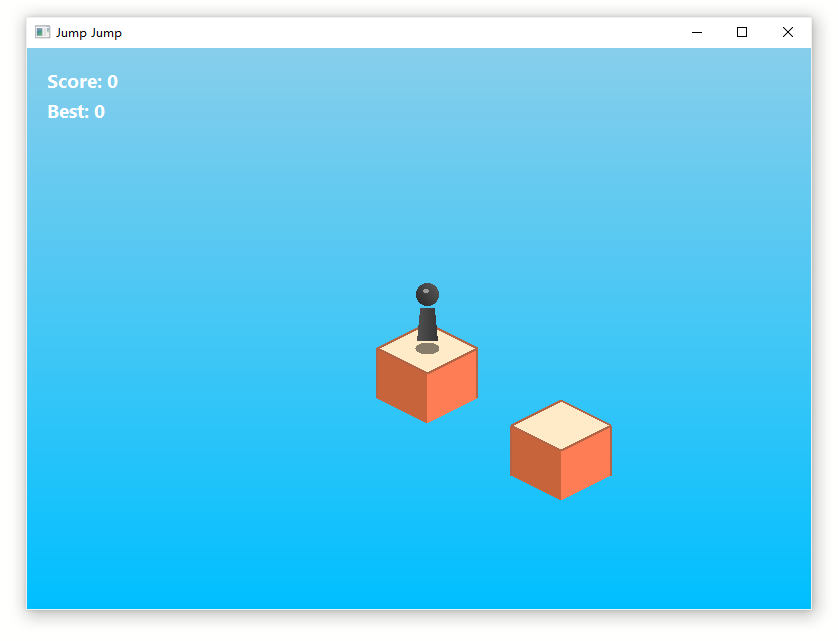
1.1 Game Features
- Isometric 3D View: Pseudo-3D rendering technology provides clear spatial awareness
- Charge-based Jumping Mechanism: Hold space to charge, release to jump - charge time determines jump distance
- Precise Landing Detection: Four landing quality levels based on landing position - Perfect/Good/Normal/Miss
- Combo System: Consecutive Perfect landings earn combo bonuses, greatly increasing scores
- Dynamic Platform Generation: Platforms are randomly generated, providing a unique experience each time
- Particle Effects: Rich particle effects feedback during jumps and landings
- Audio System: Complete sound effects for jumping, charging, landing, and perfect landings
2. Game Controls
2.1 Basic Controls
| Key | Function | Description |
|---|---|---|
| Space | Charge/Jump | Hold to start charging, release to jump |
| Enter | Start/Restart | Start game in menu, restart when game over |
| ESC | Return Menu/Exit | Return to menu during game, exit from menu |
2.2 Jumping Mechanism
Charging Phase: Hold space bar to charge
- Charge time: 0-2 seconds
- Character has a squash deformation effect during charging
- Charge bar displays above character (green to red gradient)
Jumping Phase: Release space bar to jump toward current facing direction
- Longer charge = farther jump distance (150-400 units)
- Character automatically faces the next platform
Landing Detection: System judges landing position when character lands
- Perfect: Landing point < 5% from platform center
- Good: Landing point 5%-15% from platform center
- Normal: Landing point 15%-100% from platform center
- Miss: Failed to land on platform, immediate Game Over
3. Gameplay
3.1 Game Flow
Main Menu
   ↓
Press Enter to Start
   ↓
Game In Progress
   ├─ Charge and Jump
   ├─ Move Between Platforms
   └─ Accumulate Score
   ↓
Successful Landing → Generate New Platform → Continue
   ↓
Failed Landing → Fall → Game Over
   ↓
Press Enter to Restart
3.2 Scoring Rules
3.2.1 Landing Base Points
| Landing Quality | Base Score | Criteria |
|---|---|---|
| Perfect | 4 points | Distance from center < 5% |
| Good | 2 points | Distance from center 5%-15% |
| Normal | 1 point | Distance from center 15%-100% |
| Miss | 0 points | Failed to land, game over |
3.2.2 Combo Multiplier
Consecutive Perfect landings earn combo bonuses:
| Combo Count | Multiplier |
|---|---|
| 1-2 Perfect | 1.0x |
| 2 Perfect | 1.5x |
| 3 Perfect | 2.0x |
| 4+ Perfect | 2.5x |
Note: Any non-Perfect landing resets the combo counter.
3.2.3 Scoring Examples
- 1 Perfect: 4 points
- 2 Perfect: 4 + 4×1.5 = 10 points
- 3 Perfect: 4 + 4×1.5 + 4×2.0 = 18 points
- 4 Perfect: 4 + 4×1.5 + 4×2.0 + 4×2.5 = 28 points
- Good landing: 2 points (combo resets)
- Normal landing: 1 point (combo resets)
3.3 Platform Generation Rules
Initial Platforms: 2 platforms generated at game start
- First platform position: (0, 0, 50)
- Second platform position randomly generated
Subsequent Platforms: New platform generated after each successful landing
- Distance from current platform: 150-400 (random)
- Generation direction: Randomly choose X or Y axis (always move "forward")
- Platform size: 100×100 (extensible)
Platform Structure:
- Platform height: 50 units
- Platform width: 100 units
- Platform depth: 100 units
4. Game Interface
4.1 Main Menu
- Title: "JUMP JUMP" (blue large text, centered)
- Prompt: "Press Enter to Start" (cyan text, centered)
4.2 Game Interface
4.2.1 HUD Display
Top Left:
- Score: Current score (white)
- Best: Best score (white)
Center:
- Combo indicator (only displayed when Combo > 1)
- Format: "xN combo" (gold color)
- Position: Upper center of screen
Above Character:
- Charge bar (displayed during charging)
- Size: 50×10 pixels
- Color: Green to red gradient (changes with charge level)
4.2.2 Game Screen
- Background: Sky blue gradient (SkyBlue → DeepSkyBlue)
- Platform: Wheat color + Moccasin color top surface
- Character: Black "i" shaped character (cylindrical body + spherical head) with gradient highlighting
- Shadow: Semi-transparent black circle, scales with height
- Animation Effects: Squash and stretch during charging (height compresses, width expands), recovery on jump
4.3 Game Over Screen
- Title: "GAME OVER" (red large text, centered)
- Prompt: "Press Enter to Restart" (white text, centered)
- Score and best score remain displayed
5. Technical Implementation
5.1 Development Environment
- Language: TwinBasic
- Graphics Library: GDI+ (GdiPlusUser)
- Resolution: 800×600 pixels
- Frame Rate: 80 FPS (12.5ms refresh interval)
5.2 Core Architecture
MyForm (Main Form)
   ↓
cGame (Game Controller)
   ├─ cPlayer (Player Character)
   ├─ cPlatform (Platform)
   ├─ cPlatformGenerator (Platform Generator)
   ├─ cCamera (Camera)
   ├─ cRenderer (Renderer)
   ├─ cInput (Input Manager)
   ├─ cAudio (Audio System)
   ├─ cPhysics (Physics System)
   ├─ cScoreManager (Score Manager)
   └─ cParticleSystem (Particle System)
5.3 Core Classes
cGame
- Game main controller, manages game state and all subsystems
- States: Menu → Playing → Charging → Jumping → Falling → Game Over
- Handles game loop, collision detection, landing judgment
cPlayer
- Player character class
- Properties: Position, velocity, facing direction, state, charge power
- Appearance: Black "i" shaped design (cylindrical body + spherical head) with gradient highlighting
- Animation: Squash deformation during charging (height compresses, width expands), recovery on jump
- Actions: Charge, jump, land, fall
cPlatform
- Platform class
- Properties: Position, dimensions, active state
- Methods: Point containment detection, landing quality judgment
cPlatformGenerator
- Platform generator
- Generates initial and subsequent platforms
- Randomly generates distance and direction
cCamera
- Camera class
- Implements isometric view coordinate conversion
- WorldToScreen: 3D world coordinates → 2D screen coordinates
cRenderer
- Renderer
- Uses GDI+ to draw all game elements
- Supports gradient backgrounds, rounded rectangles, ellipses, etc.
cPhysics
- Physics system
- Calculates jump initial velocity (based on charge ratio)
- Updates position and velocity (applies gravity)
- Landing collision detection
cScoreManager
- Score manager
- Handles landing scoring
- Maintains combo counter and best score record
cInput
- Input manager
- Uses Win32 API (GetAsyncKeyState) for key detection
- Supports Space, Enter, and ESC keys
cAudio
- Audio system
- Uses WinMM API (PlaySound) to play sound effects
- Loaded sounds: Jump, Land, ChargeStart, ChargeLoop, Perfect, GameOver
cParticleSystem
- Particle system
- Generates explosion effects on landing
- Perfect: Gold particles
- Normal: Gray dust particles
5.4 Technical Highlights
Graphics & Rendering
- Isometric 3D rendering using GDI+ graphics library - Full pseudo-3D isometric projection with proper world-to-screen coordinate transformation
- Custom 3D platform rendering - Diamond-shaped platforms with 3 visible faces (top, left, right) drawn using GDI+ polygons
- Dynamic shadow system - Real-time shadow scaling based on player height with transparency effects
- Gradient rendering - Sky gradient background (SkyBlue → DeepSkyBlue), player gradient brushes for 3D appearance
- Double buffering - Smooth 80 FPS rendering without flickering
Physics & Collision Detection
- Physics-based trajectory calculation - Calculates jump velocity using projectile motion physics:
v_z = sqrt(2 * g * h)for vertical velocity and time-based horizontal speed - Advanced collision detection - Diamond-shaped collision bounds that match the isometric visual representation using the formula:
|x|/(w*0.5) + |y|/(d*0.25) <= 1 - Multi-tiered landing quality detection - Precise distance calculation from platform center in diamond coordinates for Perfect (<5%), Good (5-15%), Normal (15-100%), Miss (>100%)
- Gravity simulation - Constant gravity application during jumps with realistic velocity updates
Visual Effects & Animation
- Particle system - Custom particle engine with 100+ particle capacity, gravity physics, and lifecycle management
- Gold explosion particles for Perfect landings (20 particles, RGB: 255, 215, 0)
- White dust particles for Normal/Good landings (10 particles, RGB: 255, 255, 255)
- Particle fading based on life value with alpha blending
- Squash and stretch animation - Character deforms during charging (height compresses, width expands up to 30%)
- Charge bar visualization - Real-time charge indicator with green→red gradient color transition
- Dynamic camera - Smooth camera follow using linear interpolation (Lerp) with 0.1 follow speed
Modern twinBASIC Features
- Strong typing - Full type declarations with
Assyntax throughout - Return keyword - Modern function return syntax (e.g.,
Return velocity) - Class-based OOP - Full object-oriented design with encapsulation
- Enum types - Custom enums for GameState, PlayerState, LandingQuality
- UDTs (User Defined Types) - Vector3, Vector2, ColorRGBA, Particle structures
- Safe array handling - Uses
(Not Not array) <> 0pattern for safe array bounds checking
Performance Optimizations
- High-performance rendering at 80 FPS - 12.5ms refresh interval using Timer control
- Efficient particle rendering - Brush reuse optimization, only creating new brushes when color changes
- Dynamic array management - Particle system uses dynamic capacity doubling (100 → 200 → 400...)
- Early exit optimizations - Null checks and bounds checking throughout rendering pipeline
5.5 Game Constants
' Jump distance
MIN_JUMP_DISTANCE = 150.0
MAX_JUMP_DISTANCE = 400.0

' Physics parameters
GRAVITY = 0.5
MAX_CHARGE_TIME = 2.0

' Platform parameters
PLATFORM_BASE_SIZE = 100.0
PLATFORM_HEIGHT = 50.0

' Screen parameters
SCREEN_WIDTH = 800
SCREEN_HEIGHT = 600

' Camera offset
CAMERA_OFFSET_X = 0.0
CAMERA_OFFSET_Y = -100.0
6. Game Resources
6.1 Audio Files
The game includes the following sound effect files (located in resources/AUDIO/ directory):
| Filename | Purpose | Trigger |
|---|---|---|
| CHARGE_START | Charging start sound | Press space to start charging |
| CHARGE_LOOP | Charging loop sound | Continuously plays during charging |
| JUMP | Jump sound | Release space to jump |
| LAND | Normal landing sound | Normal/Good landing |
| PERFECT | Perfect landing sound | Perfect landing |
| GAMEOVER | Game over sound | Fall or miss platform |
6.2 Icon Files
- Game icon:
resources/icon/twinbasic.ico
7. Game Tips
7.1 Basic Tips
Observe Platform Distance: After a new platform generates, observe its distance from the current platform
- Closer platforms: Short charge time (~0.5-1 second)
- Farther platforms: Long charge time (~1.5-2 seconds)
Use Charge Bar: Watch the charge bar color above the character
- Green: Low charge level (short jump)
- Yellow: Medium charge level (medium jump)
- Red: High charge level (long jump)
Character Facing: Character automatically faces the next platform, no manual adjustment needed
7.2 Advanced Tips
Aim for Perfect:
- Perfect landings can combo, greatly increasing score
- Try to land in the exact center of the platform
- Perfect landings have gold particle effects and special sound effects
Combo Management:
- 4 or more Perfect landings have a 2.5x multiplier
- If you can't achieve Perfect, choose Good over Miss
- After combo resets, you can start building again
Rhythm Control:
- Don't rush to jump, first observe the new platform position
- Maintain a steady rhythm, avoid consecutive mistakes
- Don't charge more than 2 seconds, it will automatically limit to maximum
Spatial Awareness:
- Familiarize yourself with the relationship between jump trajectory and landing position
- With practice, you can more accurately judge charge time
8. FAQ
Q1: Why can't I seem to land on platforms?
A: Possible reasons:
- Inaccurate charge time: Try adjusting charge time based on platform distance
- Insufficient or excessive charge: Watch the charge bar color, green→red represents charge level
- Platform too far: Game randomly generates platforms at 150-400 distance, some may be harder
Q2: How can I get a high score?
A:
- Aim for Perfect landings, build up combos
- 4 or more Perfect landings have 2.5x multiplier, quickly increasing score
- Stay calm, don't risk Miss for Perfect
- With practice, you can more accurately judge charge time
Q3: When does Combo reset?
A:
- Any non-Perfect landing (Good/Normal) resets the combo
- Miss (failed landing) results in immediate Game Over, combo also resets
Q4: Is there a maximum score limit?
A:
- Theoretically no, as long as you can successfully land continuously, you can play indefinitely
- However, as platform distances vary randomly, difficulty gradually increases
Q5: Why does the character sometimes fall directly?
A:
- During jumping, if the character doesn't land on a platform, it will continue falling
- When Z coordinate is less than -500, it's judged as Game Over
- This is due to missing the platform or over-charging
9. Version Information
- Game Name: Jump Jump
- Version: 1.0
- Development Language: VB6 / TwinBasic
- Development Time: 2026
- Game Type: Isometric 3D Jumping Platform Game
10. Future Improvements
10.1 Game Content
- [ ] Add more platform types (moving platforms, disappearing platforms, etc.)
- [ ] Introduce obstacles and special items
- [ ] Add more visual effects (weather, time changes, etc.)
- [ ] Add level mode and challenge mode
10.2 Technical Optimization
- [ ] Optimize rendering performance
- [ ] Support higher resolutions
- [ ] Add save functionality (save best score to file)
- [ ] Improve audio system (support looping, mixing, etc.)
10.3 User Experience
- [ ] Add tutorial
- [ ] Provide settings options (volume, difficulty, etc.)
- [ ] Add pause function
- [ ] Support gamepad control
Appendix: Source Code File Structure
src3/
├── Sources/
│   ├── Core/
│   │   ├── cGame.twin          # Game Controller
│   │   ├── cPlayer.twin        # Player Character
│   │   ├── cPlatform.twin      # Platform
│   │   ├── cPlatformGenerator.twin  # Platform Generator
│   │   ├── cCamera.twin        # Camera
│   │   ├── cRenderer.twin      # Renderer
│   │   ├── cInput.twin         # Input Manager
│   │   ├── cAudio.twin         # Audio System (WinMM PlaySound)
│   │   ├── cPhysics.twin       # Physics System
│   │   ├── cScoreManager.twin  # Score Manager
│   │   ├── cParticleSystem.twin  # Particle System
│   │   ├── mTypes.twin         # Type Definitions and Constants
│   │   └── mUtils.twin         # Utility Functions
│   ├── myform.twin             # Main Form
│   └── myform.tbform           # Form Designer
├── resources/
│   ├── AUDIO/                  # Audio Resources
│   │   ├── CHARGE_START
│   │   ├── CHARGE_LOOP
│   │   ├── GAMEOVER
│   │   ├── JUMP
│   │   ├── LAND
│   │   └── PERFECT
│   ├── icon/                   # Icon Resources
│   │   └── twinbasic.ico
│   └── manifest/               # Manifest Files
├── Readme_zh.md                # Chinese Documentation
└── README.md                   # This Document
Enjoy the game! 🎮